Chromis 1.4.3: resize, fonts and an AI fix the emulator missed
(android, ai, onnx-runtime, release-notes) 7 min read by Bartosz Pachołek
Chromis 1.4 resizes whole images, adds twelve caption fonts and lets you choose how Fill works. Getting there took three ONNX Runtime fixes, and the first one broke object removal on most ARM phones.
Chromis 1.4.3 is out. Since our post on AI cutout and object removal on a phone, it has learned to resize a whole image, gained twelve caption fonts plus the ones already on the phone, and lets you choose how Remove object fills the hole it leaves. Most of the work in between went into the AI tools, though: three bugs in how we run ONNX Runtime on Android, and the fix for the first one caused the third.
Below are the features, then the three bugs in the order we hit them, and what we changed so the last one cannot ship again.
What is new
Resize the whole image
The size button in the editor's top bar now opens one sheet with two tabs. Canvas changes the canvas around the layers, as before. Image scales the whole picture: every layer in every frame is moved and scaled, a collage's borders with it, and every photo gets new pixels from the method you pick: Nearest neighbour, Bilinear, Bicubic or Lanczos. It is one undo step.
The resampling runs on the CPU, because a method you pick by name has to be the method that runs, and a GPU draw has no Lanczos to ask for. Each photo is resampled to the size it covers on the resized canvas, so the export draws it 1:1 and never resamples it a second time. The photo import limit rises from 2048 to 4096 px.
Fill in: Best quality or Low memory
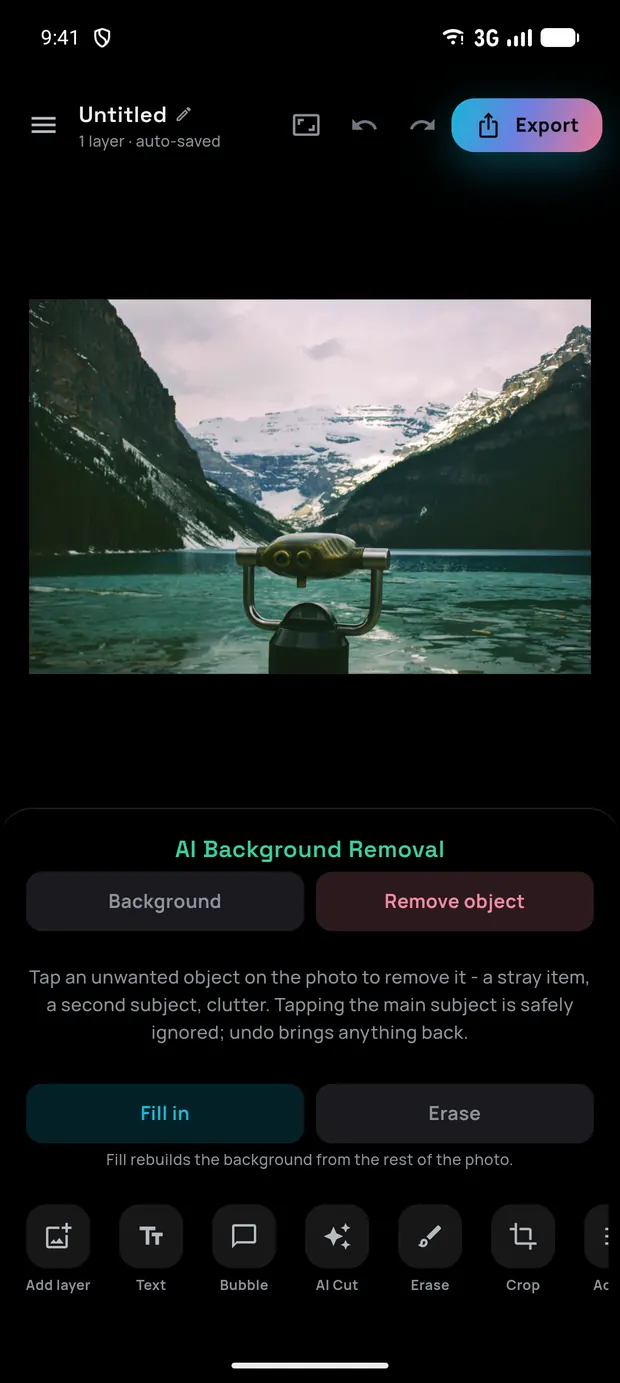
Fill in used to try the MI-GAN model and fall back to a content-aware fill, with no say in which one ran. Now you choose, and the options are named by what they cost rather than by model. Measured on an emulator with a 2048 px photo:
| Option | What runs | Peak memory | Time |
|---|---|---|---|
| Best quality | MI-GAN, then content fill if it fails | 454 to 460 MB | 7.6 to 24.6 s |
| Low memory | content fill alone | 39 to 46 MB | 1.6 to 3.0 s |
The first fill asks, with a guess preselected: Low memory on a phone with less than 3 GiB of RAM or less than 1 GiB free at the time, Best quality otherwise. It follows on from the second bug below, which is about what memory does to a 2 GB phone.
Fonts
Captions and bubbles now have 17 bundled fonts instead of 5, and every one covers the full alphabet of all six app languages: a missing ą or ř falls back to the system font in the middle of a word, so faces that lacked them were left out. Chromis also offers the fonts already on the phone, read straight from Android's font directories with no permission needed.
Since 1.4.1, a phone font is offered only if its own file declares the SIL Open Font License or the Apache License 2.0. Phone makers ship their own faces, such as Google Sans on a Pixel, licensed for the maker's software rather than for pictures made in another app. Everything sits in one searchable picker.
Limits that say so
A pinch that reaches a layer's smallest or largest size now shows a badge and gives a light haptic tick, instead of the layer silently not following your fingers. The canvas size sheet and the Bubble panel also say when you have reached their limits.
Three ONNX Runtime bugs
Chromis runs three ONNX models on the phone through ONNX Runtime (ORT): MobileSAM to select an object you tap, U²-Netp as the fallback for background removal, and MI-GAN for Fill in. Every ORT failure is quiet by design: if MobileSAM fails, the app says the AI is unavailable; U²-Net falls back to ML Kit; MI-GAN falls back to content fill. So "the app did not crash" proves nothing. And we did not own any of the affected phones: the first two reports came from Android vitals in Play Console.
1. SIGILL on the newest Snapdragons
On a Galaxy S26, a razr fold or a OnePlus 15, Chromis closed the moment Remove object was opened. These run the Snapdragon 8 Gen 5 or 8 Elite Gen 5, whose cores report SME but not SME2. ORT 1.23 switched its KleidiAI kernels on for any CPU reporting SME, and those kernels are SME2 code, so the first MobileSAM pass executed an illegal instruction. A SIGILL kills the process, so no try in Dart and no fallback ever ran.
It looked like an object removal bug only because opening that panel warms up the MobileSAM encoder straight away, and background removal defaults to ML Kit, so that warm-up was the first ORT call of most sessions. Every ORT feature was affected.
With no such phone to test on, we shipped two independent fixes: flutter_onnxruntime 1.8.2 to 1.9.0, which brings ORT 1.28 and picks SME or SME2 kernels at runtime, and mlas.disable_kleidiai=1 on every session in case that detection is wrong on chips nobody here can try. We skipped ORT 1.27 on purpose: it silently miscomputes on the 8 Elite Gen 5 (SM8850), which is worse than a crash.
2. An ANR with an idle main thread
On an Infinix Smart 7 HD with 2 GB of RAM, Android reported "Input dispatching timed out" with the main thread idle in nativePollOnce. Nothing of ours was running on that thread, so the question was what else could starve the phone.
The answer was ORT's CPU memory arena. It grows to fit a run and hands nothing back while its session lives, and every session in Chromis except the SAM encoder lives as long as the process. With a 2048 px photo, one U²-Net cut kept 200 MB and two MI-GAN fills kept 1.1 GB. On a 2 GB phone that means constant swapping to compressed memory, in which the main thread is not scheduled for seconds; by the time the system samples it, it has nothing left to do.
With the arena off, the same two fills keep 44 MB and take the same time, and the peak for the whole process falls from 1.6 GB to 1.0 GB. The fill works just as fast either way, so only memory shows the difference, and a device test now asserts on it directly: with the arena back on it fails at +1,171 MB.
3. The fix that broke the feature
1.4.2 was the first build with ORT 1.28 to reach users. On a Xiaomi 15 Ultra (Snapdragon 8 Elite, Android 16) running it from Google Play, tapping an object said the object removal AI "isn't available on this device". The MobileSAM encoder would not create its session:
ORT_NOT_IMPLEMENTED: Failed to find kernel for com.microsoft.Gelu(1) ...
implemented only for (tensor(float)), but the node in the model has
(tensor(float16))
Our MobileSAM is an fp16 model whose GELU activations are written out as Erf arithmetic; the file has no Gelu node at all. ORT 1.28's graph optimizer fuses that arithmetic into a single fp16 com.microsoft.Gelu on any ARM CPU with fp16 arithmetic, then finds no fp16 kernel for the node it just created. That is nearly every phone sold since 2018. So the fix for bug 1 left the AI half of Remove object dead for most people on 1.4.2. The erase brush, and tapping away the loose islands of a cut-out, kept working.
After bug 1 we had written device tests that assert each model actually ran, not just that the app survived. They passed. They ran on an x86_64 emulator, which has no fp16 path, so the fusion never fires there.
The fix is one more entry in the options every ORT session in the app is created with, next to the ones from the first two bugs:
const Map<String, String> kOrtSessionConfigs = {
  'mlas.disable_kleidiai': '1',
  'optimization.disable_specified_optimizers': 'GeluFusionL1;GeluFusionL2',
};

OrtSessionOptions ortSessionOptions() =>
    OrtSessionOptions(sessionConfigs: kOrtSessionConfigs, useArena: false);
That separator is the last part of the struggle. Our first attempt wrote the list with a comma. ORT splits it on ;, so with a comma the whole value is one unknown optimizer name: nothing is disabled and nothing says so. A unit test now pins both the names and the separator. U²-Net and MI-GAN are fp32 with at most one Erf, so running those steps unfused costs them nothing measurable.
We checked it on the Xiaomi itself, with the device tests built as a separate debug app (a temporary applicationIdSuffix) installed next to the Play version, so the projects on that phone were never touched:
| Device test | 1.4.2 | 1.4.3 |
|---|---|---|
| MobileSAM | session fails, ORT_NOT_IMPLEMENTED |
2.7 s, mask of 44,981 px for a 45,239 px disc |
| U²-Net | 654 ms, passes | 637 ms, passes |
| MI-GAN | not run | 2.9 s, no object pixels left |
What we changed
- One place for session options. Every ORT session is created through
ortSessionOptions(), and a test fails if anycreateSessioncall in the app skips it. - Tests that prove the model ran. "The app did not crash" is not a pass when every failure falls back quietly.
- An ARM phone after every ORT upgrade. An x86 emulator never runs the code paths that broke here: neither the SME kernels of bug 1 nor the fp16 fusion of bug 3.
- Releases from a workflow. Publishing a GitHub release now tests the tag, builds the signed bundle and uploads it to Google Play. Setting it up showed that the newest build on Play was still 1.3.0, because 1.3.1, 1.4.0 and 1.4.1 had never been uploaded. Most people using Chromis from Play therefore go from 1.3.0 straight to 1.4.3.
Bugs 1 and 2 are fixed without a device of our own that showed them, so the real check is those reports going quiet in Android vitals, and we are watching them.
Chromis is free and supported by ads, and a one-time purchase removes them. Get it on Google Play, or read more on the Chromis software page.