$ wsl-tray --price
free
- Free to download and use
- Source code on GitHub under the BSD 3-Clause license
A Windows tray icon that shows whether the WSL2 VM is running and how much CPU and memory it uses, with a menu entry that shuts it down.
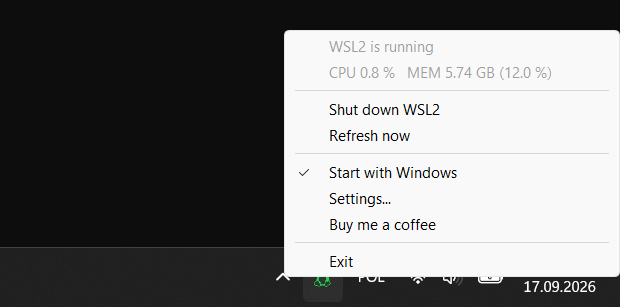

wsl-tray - a Windows tray icon that shows whether the WSL2 VM is running and how much CPU and memory it uses, with a menu entry that shuts it down
wsl-tray sits next to the clock like the keyboard-layout badge. Grey means the WSL2 VM is off; green, orange or red mean it is running and show how much of the machine it uses, by whichever of CPU or memory is higher. Hover for the numbers.
The menu shuts WSL2 down after a confirmation, refreshes the numbers, toggles start with Windows and opens a settings dialog for the two thresholds.
$ wsl-tray --price
$ wsl-tray --sponsor
If wsl-tray saves you time, you can support its development. It pays for the hours that go into fixes and new releases.
v1.3.0 · release notes ↗
| Platform | Arch | Get it from | Notes | Action |
|---|---|---|---|---|
| windows 11 | x64 | GitHub Releases, .exerecommended | Watches the vmmemWSL process. | get it |
| windows 11 | arm64 | GitHub Releases, .exe | Watches the vmmemWSL process. | download |
| windows 10 | x64 | GitHub Releases, .exe | Watches the vmmem process. | download |
| windows 10 | arm64 | GitHub Releases, .exe | Watches the vmmem process. | download |
$ git clone https://github.com/ideaconnect/wsl-tray