
Generate
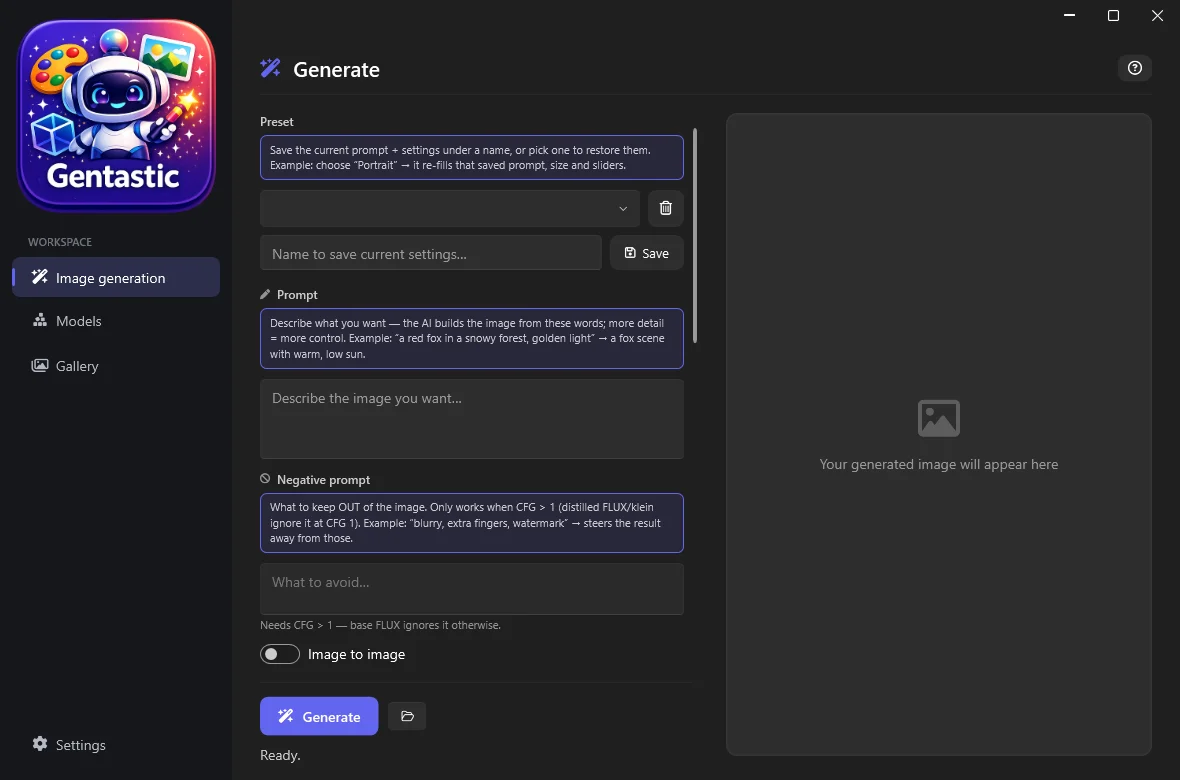
Prompt, model, size and steps on the left; a live preview on the right. Hint boxes explain every field until you turn them off.
 (open full size)
 bartosz@idct:~/software/gentastic$ gentastic --features
The easiest way to run FLUX and SDXL on your own GPU: pick a model, type a prompt, hit Generate. No node graphs, no Python, no account.
Why Gentastic
Sane defaults for every field, so you can start generating before you know what CFG or a sampler even is.
Pick a model from the list and Gentastic downloads it from Hugging Face, verifies it, and snaps steps, CFG and resolution to sane defaults automatically.
Full prompt and negative-prompt control, batch generation, seeds, and saved presets you can recall in one click.
PhotoMaker-based identity lock: give it a reference photo and generate new scenes of that same person, without a training run. Apply only to your own photos.
FLUX Kontext and klein editing: describe the change ("put them on a beach") and it edits the photo while keeping everything else, composition and identity included.
Every generation is auto-saved with its full parameters embedded in the PNG (prompt, seed, steps, CFG, sampler, model), browsable with instant thumbnails.
No account, no cloud queue, no telemetry: generations never leave your machine. Gentastic auto-detects CUDA or Vulkan and picks the fastest backend you actually have.
Native WPF, not Electron: the window opens instantly and feels like Windows software because it is Windows software.
Prompt, model, size and steps on the left; a live preview on the right. Hint boxes explain every field until you turn them off.
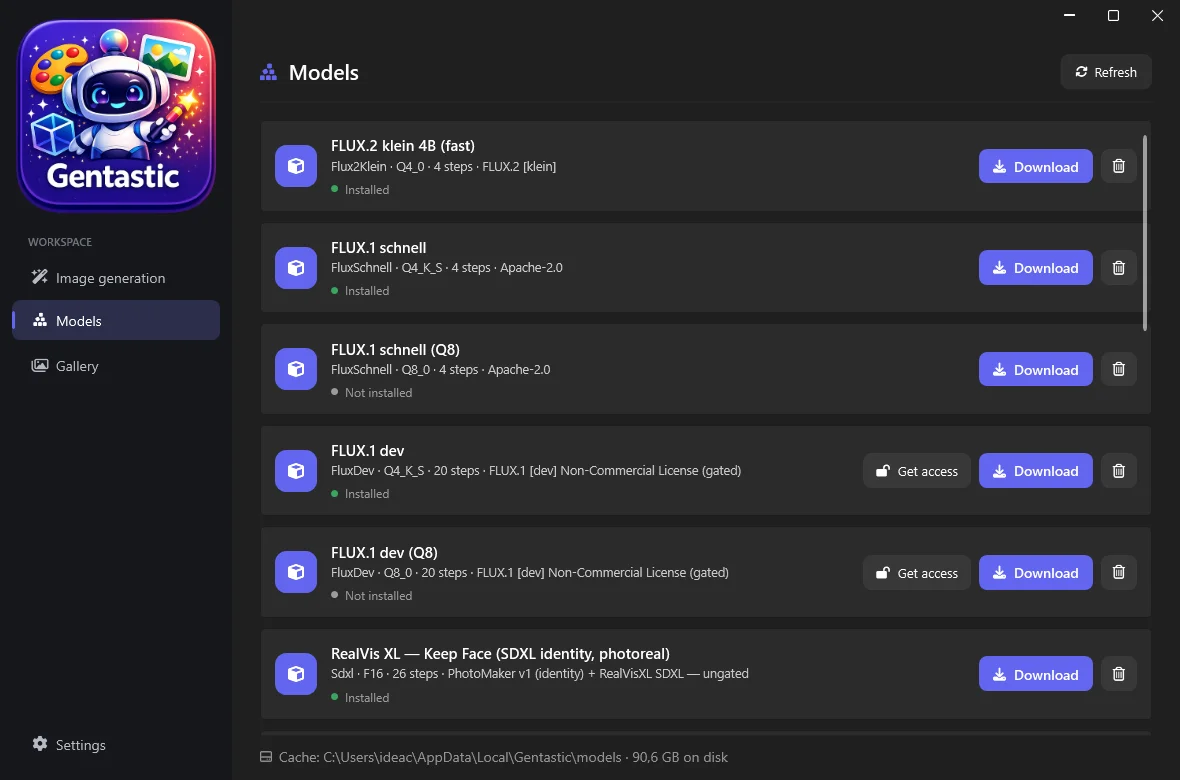
(open full size) Every model in one list: installed state, quantization, licence, and a one-click download or delete. Licence-gated models such as FLUX.1-dev ask for a Hugging Face token first.
 (open full size)
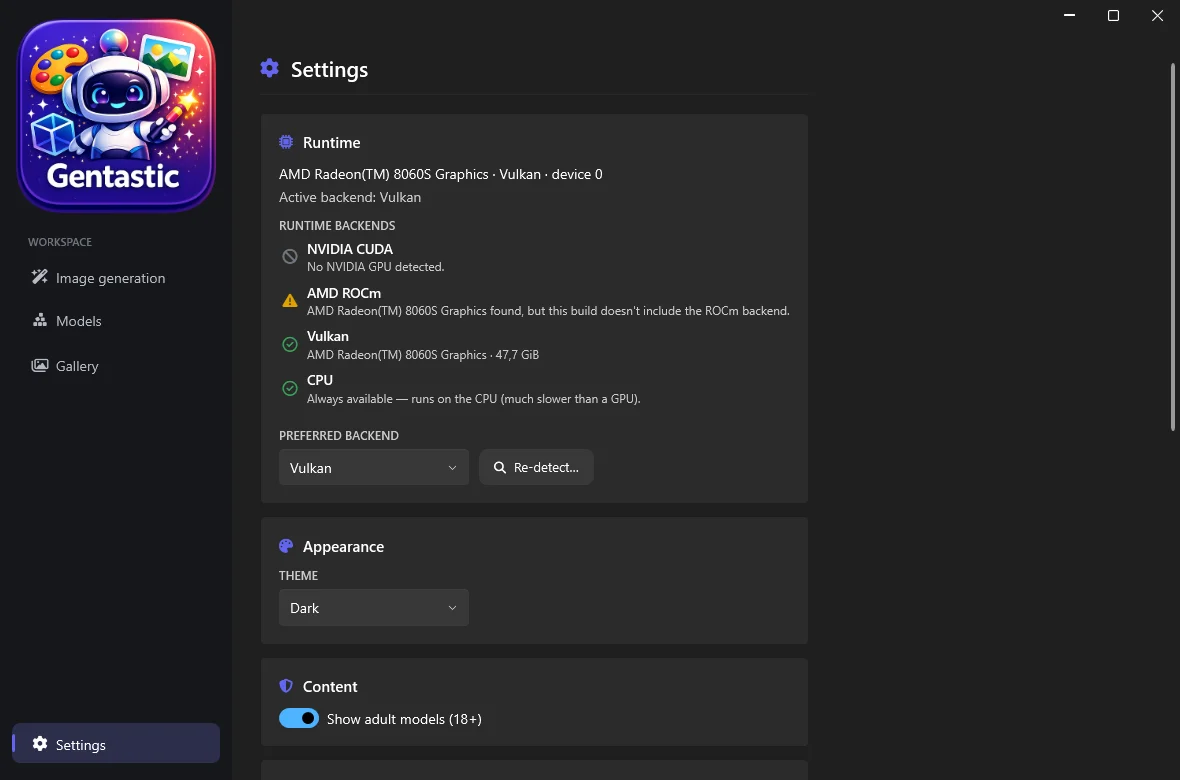
 The runtime backend and the hardware it detected, the cache location, the theme, and the adult-content visibility toggle, all in one place.
 (open full size)
 Under the hood
Gentastic runs on stable-diffusion.cpp through StableDiffusion.NET, with GGUF quantized models: small downloads, real performance.
GTX 10-series through RTX 50-series. Don’t have the CUDA Toolkit? Gentastic can fetch a ~570 MB on-demand CUDA runtime for you: no separate install.
The stable, fast path on AMD GPUs, including unified-memory APUs like the Ryzen AI Max "Strix Halo" / Radeon 8060S. No ROCm install, no Python.
Vulkan already covers AMD GPUs today. Native ROCm 7 acceleration is being integrated next, as the upstream StableDiffusion.NET ROCm backend matures and gets validated on real AMD hardware.
Generation
Built as a focused alternative to node-graph tools: every feature below works from sane defaults, with an optional hint box explaining what each field does.
Prompt and negative prompt, seed control, and every advanced slider you’d want, all with working defaults, so you only touch what you want to change.
Drag and drop an input image, set a denoise strength, and let any supported model reimagine it from your prompt.
FLUX.1 Kontext and FLUX.2 klein editing models take an instruction ("change the suit to grey", "put them on a beach") and edit the photo while preserving the rest.
PhotoMaker-based models generate a specific person, from one reference photo, in new scenes without changing their face. No training, no LoRA to bake.
Switching models only offers resolutions that work well for it (SDXL’s native buckets, FLUX’s flexible sizes), so you can’t accidentally pick a size that distorts the output.
Save the current prompt and every parameter under a name, and restore the whole setup in one click next time.
Models
Pick a model and Gentastic fetches it from Hugging Face with progress, resumable downloads, and licence/token gating for restricted models like FLUX.1-dev.
schnell and dev variants, plus the newer, faster FLUX.2 klein: the default, about 4 steps to a finished image.
Photoreal and anime-focused SDXL checkpoints, each with the quality tags they expect applied automatically: you don’t need to know what they are or type them yourself.
FLUX models ship as GGUF at several quantization levels (Q4 to Q8, F16): smaller downloads and predictable memory use. SDXL checkpoints load as single files, as usual for that format.
See what’s installed and how much disk it uses, and download or delete any model, all from one page, with the cache folder configurable in Settings.
The negative-prompt box only lights up for models where it does something, so you’re never left typing into a field that’s silently being ignored.
Runtime and performance
Gentastic probes CUDA, Vulkan and CPU on first run and picks the fastest one your GPU actually supports. Override it any time in Settings.
No CUDA Toolkit on your machine? Gentastic can download a ~570 MB CUDA runtime just for itself: nothing system-wide to install.
Per-step progress with a distinct "decoding" phase, plus one-click cancel on any generation.
If a generation runs out of VRAM, Gentastic tells you what changes the odds (smaller size, fewer steps, a lower-quant model) instead of a bare stack trace.
Workflow
Every save embeds prompt, negative prompt, model, seed, steps, CFG and sampler directly in the PNG: browse your history and see exactly how each image was made.
A disk-backed thumbnail cache keeps the Gallery snappy even with hundreds of generations.
Every field has an optional hint box explaining what it does, with a concrete example. Toggle it off once you know the app.
A modern Fluent-style interface (WPF-UI) that follows the Windows theme, or stays fixed to whichever you prefer.
$ gentastic --get
Unzip and launch in under a minute. Pick a model (the first download takes a little longer, depending on your connection), then generate. That is the whole setup.